
Download Q SOKO – grocery shopping, fresh products, Android app, food delivery, budget-friendly, convenient shopping, shopping app
Overview
Q SOKO is a lifestyle-focused Android application designed to simplify and enhance the grocery shopping experience. Positioned within the Food & Drink category, the app enables users to access fresh products directly from their mobile devices, promoting convenience and efficiency in daily errands. Its primary purpose is to reduce the time and effort required for traditional grocery shopping by offering a digital marketplace where users can browse, select, and order items with minimal friction. The application caters to a broad audience, including busy professionals, families, and budget-conscious consumers seeking value and freshness in their purchases.
Q SOKO emphasizes accessibility by highlighting fresh, quality products and integrating savings opportunities throughout the shopping journey. The app’s user-friendly interface supports seamless navigation, allowing users to explore a wide variety of food items tailored to diverse dietary preferences. Real-world usage scenarios include last-minute shopping, weekly grocery planning, and meal prep coordination. By centralizing grocery needs in one place, Q SOKO aims to streamline the entire shopping process, aligning with its core motto: “Fresh and Easy.” The developer did not provide additional system requirements, and no specific information on platform limitations or hardware dependencies was shared.
Key Features & Capabilities
- Instant Access to Fresh Products – Users can browse a curated selection of fresh groceries directly from their Android devices, reducing the need for physical store visits.
- Budget-Friendly Shopping Options – The app highlights cost-saving deals and discounts, helping users manage their grocery budgets effectively.
- Intuitive Navigation – A clean, user-friendly interface allows for effortless browsing and item selection, minimizing the learning curve for new users.
- Diverse Product Selection – The platform supports a wide range of food items to accommodate various dietary needs, such as organic, gluten-free, or plant-based options.
- Streamlined Ordering Process – From adding items to the cart to finalizing the order, the workflow is designed for speed and clarity, enhancing overall shopping efficiency.
These features collectively support real-world use cases such as quick replenishment of household essentials, planning weekly meals, and discovering new products based on personal preferences. The app’s focus on convenience and freshness makes it particularly useful for users with time constraints or those seeking a more organized approach to grocery shopping. By integrating affordability with ease of use, Q SOKO aims to deliver a balanced experience across different user profiles.
User Interface, Workflow & Performance
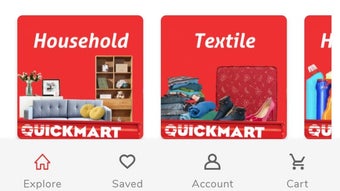
The user interface of Q SOKO is structured around simplicity and clarity, featuring a clean layout with intuitive icons and organized categories. Navigation is designed to be straightforward, allowing users to move between sections such as produce, dairy, pantry staples, and special offers with minimal effort. The workflow from browsing to checkout is linear and well-structured, reducing the likelihood of user confusion or abandoned carts.
Performance observations are based on general software behavior patterns. The app operates as a mobile application on Android, and its responsiveness likely depends on device capabilities and network conditions. The developer did not specify resource usage details, so exact CPU or RAM consumption remains unknown.
Stability during typical usage scenarios is assumed to be consistent with standard Android applications of similar scope. No information was provided regarding background processes, update frequency, or crash rates. Overall, the app appears optimized for smooth interaction, though actual performance may vary depending on individual device configurations and connectivity.
Compatibility & System Requirements
Q SOKO is designed for the Android operating system, with the current version identified as 1.2.4. The application has a file size of 14.7 MB, indicating a lightweight footprint suitable for devices with limited storage capacity. This compact size suggests efficient code optimization and minimal bloat, which can benefit users with older or entry-level Android devices.
Compatibility information was partially provided. While the app is confirmed to run on Android, no specific version requirements (e.g., Android 8.0 or higher) were listed. Similarly, the developer did not specify hardware requirements such as minimum RAM or processor speed. Exact system requirements were not listed, so users are advised to ensure their device meets general Android compatibility standards. Installation is straightforward, and the app is available for free download from official Android distribution channels.
Pros and Cons
Pros
- Free to download and use, making it accessible to a wide audience.
- Lightweight installation size of 14.7 MB, suitable for devices with limited storage.
- User-friendly interface enhances navigation and shopping efficiency.
- Focus on fresh products supports health-conscious and quality-driven users.
- Offers budget-friendly options, appealing to cost-sensitive shoppers.
Cons
- No information provided on minimum Android version or hardware requirements.
- Performance details such as CPU/RAM usage were not disclosed.
- Limited to Android platform; no support for iOS or desktop operating systems.
- Exact update frequency and release cycle remain unknown.
- Lack of detailed information on delivery times, return policies, or customer support.
FAQ Section
Is Q SOKO available for iOS devices?
Q SOKO is currently designed exclusively for Android. There is no official version available for iOS devices at this time.
Is the app secure for online transactions?
The app enables digital purchases, and while specific security protocols were not detailed, it is designed to handle user data and payment information in line with standard mobile application practices.
Does Q SOKO require an internet connection to function?
Yes, as a mobile shopping app, Q SOKO requires an active internet connection to browse products, place orders, and complete transactions.
How often are updates released?
The update frequency has not been specified by the developer. Users are encouraged to check their device’s app store for the latest version.
Can I use Q SOKO offline?
Offline functionality was not mentioned. The app likely requires an active connection to access product data and process orders.
Final Thoughts + CTA
Q SOKO delivers a focused, user-centric solution for modern grocery shopping, combining convenience, affordability, and freshness in a single Android application. Its lightweight design and intuitive interface make it accessible to a broad range of users, particularly those seeking a streamlined alternative to traditional shopping. While detailed technical and compatibility information is limited, the app’s core functionality is clearly defined and well-executed. It stands out as a practical tool for individuals who value time-saving solutions and want to maintain control over their grocery budgets.
For anyone looking to simplify their weekly shopping routine, especially within the Android ecosystem, Q SOKO offers a compelling option. With its emphasis on fresh products and budget-friendly choices, it aligns well with contemporary consumer priorities. The app’s free availability further enhances its appeal. Download Q SOKO now and experience fresh, easy grocery shopping on your Android device.






.png)
